Animals

Home | Animals

The Best Smart Pet NFC ID Locator Tags

When it comes to keeping your furry friends safe, The Pet Tap offers the best pet ID tags available. Designed with advanced technology and built to last, our smart tags are a reliable solution to help reunite you with your wandering companions. Whether you are looking for a pet ID for your adventurous dog or a curious cat, The Pet Tap ensures your peace of mind with every tag.
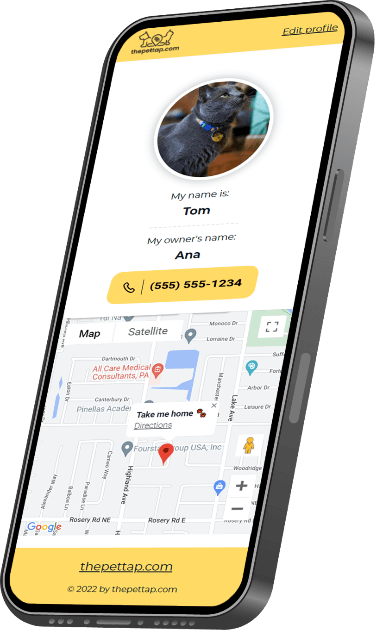
With Pet Tap, You Don’t Have to Worry About the Safety of Your Companion

By posting the pet’s name, phone number, and the address you wish your buddy returned to, the finder can save the day and bring your four-legged friend home fast.

Don’t worry about moving or changing the info, either. You can edit the profiles as many times as you’d like.

And, with our pet ID tags, your information stays private as long as you wish. You can lock your profile, keep the information to yourself, and only unlock it when necessary. That way, your pet will be safely returned home without any privacy risks.

Why Choose The Pet Tap?

We know how much your pets mean to you. That’s why we’ve created a smarter, easier way to keep them safe. With The Pet Tap smart tags, you’ll never have to worry about your pet getting lost without a way to find their way back.
Here’s why our pet ID tags stand out:

Easy-to-use NFC technology:

Tap your phone on the tag to access essential contact details.

Easy-to-use NFC technology:

Tap your phone on the tag to access essential contact details.

Easy-to-use NFC technology:

Tap your phone on the tag to access essential contact details.

Easy-to-use NFC technology:

Tap your phone on the tag to access essential contact details.

Smart Features for Smart Pets

At The Pet Tap, we believe every pet deserves the best pet ID tags. Our tags are more than just a stylish accessory—they’re a high-tech solution for your pet’s safety.

How To Enable NFC in Your Phone

FAQ

Creating your Blinq digital business card takes less than a minute. Start by creating your card, or by downloading the app (iOS/Android). You’ll be guided through the card creation process, where you can add your contact details, a profile photo, and customize your card with your company logo. Once done, you’ll be ready to start sharing straight away.